AI Automation for Accounting Firms: Replace Manual Tax Work
Discover how operational AI automation eliminates 15+ hours of manual IRS portal work, Excel reconciliations, and data entry for accounting firms with 40+ cl...

Key Takeaways
- Advisory-only AI helps with tax research and interpretation but doesn't eliminate manual operational work like IRS portal downloads and Excel reconciliations
- Operational automation platforms can save audit managers 15+ hours weekly by automating data acquisition, reconciliations, and reporting
- The right choice depends on whether your firm's bottleneck is interpretive expertise (advisory AI) or operational time waste (automation)
- Comprehensive automation integrates regulatory research directly with client-specific data, providing contextualized answers impossible with generic chatbots
- For firms managing 60-80 clients, operational automation transforms audit managers from data processors to strategic supervisors
Summary
This article contrasts two AI approaches for accounting firms: advisory-only chatbots that answer tax questions versus comprehensive operational automation platforms that eliminate manual processes. It details 8 specific controls transformed by automation (reconciliations, tax payments, W-2/1099 processing, expense classification, revenue analysis, tax forecasting, regulatory research, and reporting). The decision matrix helps firms determine which approach fits their needs based on client volume, time lost to manual work, and strategic goals. For firms managing 40+ clients, operational automation can save 15+ hours weekly per audit manager by replacing IRS portal downloads, Excel reconciliations, and manual data entry with intelligent automated processes.
Studio Control Systems: AI That Replaces IRS Portals, Excel, and 15 Hours of Manual Data Entry
How operational automation transforms tax reconciliations, analysis, and forecasting from manual drudgery to intelligent processes
Monday Morning for the Audit Manager
Monday morning, 8:30 AM. Sarah, audit manager at a firm with 70 clients, logs into the IRS Business Tax Account portal for her first client of the day. The routine is always the same:
- Download W-2s and 1099s → copy into Excel
- Download quarterly tax payments (Form 941, estimated payments) → create another worksheet
- Download vendor invoices from client portal → build pivot table for sales tax verification
- Copy data → reaggregate → verify reconciliations
- Search IRS publications for a specific compliance question
- Create summary report for firm documentation
- Repeat the entire process for the next client
The problem isn’t data volume. It’s operational tedium. Click, download, copy, paste, verify, search, format. Always. For every client. For every tax period. For every quality control check.
Sarah can’t delegate this responsibility. She’s the one who signs off. She’s the one who must guarantee everything reconciles. And it’s 15 hours per week she’d rather spend doing something else.
Two Philosophies of Artificial Intelligence
Over the past two years, the market has produced two completely different approaches to AI for accountants. Understanding which one your firm actually needs can save you years of frustration.
Philosophy 1: The Advisory Assistant
The specialized chatbot for tax regulations and compliance research. A virtual expert that answers your questions. Excels at:
- Rapid search of IRS publications, revenue rulings, and court cases
- Interpretation of complex tax code provisions
- Opinions on difficult interpretive scenarios
- Generation of client letters and technical memoranda
It’s brilliant at what it does. But there’s a clear limitation: it doesn’t touch your operational processes. It doesn’t download anything for you. It doesn’t analyze your clients’ data. It doesn’t generate automatic reconciliations. You still have to open the IRS portal, export to Excel, create pivot tables, and copy-paste manually.
The advisory assistant helps you think better. But the manual work that precedes the thinking remains entirely on your shoulders.
Philosophy 2: Operational Automation + Integrated Advisory
A system that replaces repetitive manual processes:
- Automatically acquires documents from IRS portals and client systems
- Executes reconciliation checks without human intervention
- Generates predictive analysis on tax liabilities and scenarios
- Applies AI-powered regulatory research directly TO your specific client data
- Produces automated reports ready for firm documentation
The key difference is simple: the first supplements your work. The second eliminates manual work that shouldn’t exist in 2025.
Pure advisory AI solutions provide quality assistance for resolving tax questions. Comprehensive platforms are built for a different mission: automating the operational processes that precede high-value advisory work.

The 8 Controls Transformed by Automation
Let’s examine what concretely changes in Sarah’s weekly workflow.
1. Invoice, Withholding, and Payment Reconciliations
Before: IRS portal → Manual download → Excel → SUMIF() formulas → Visual discrepancy review → Error investigation
After: Automatic acquisition from tax portals + Immediate alerts on reconciliation anomalies
2. Tax Payment Verification from Multiple Preparers
Before: Firm prepares estimated payments → Outside CPA prepares payroll taxes → Client makes ad-hoc payments → Sarah downloads everything → Verifies totals → Searches for errors and duplicates
After: Unified multi-source view with automatic flags on unusual amounts or missing payments
3. W-2 and 1099 Processing for Tax Returns
Before: Download all client W-2s and 1099s → Transcribe data into tax return → Verify amount consistency → Manually populate forms
After: W-2/1099 data already structured, aggregated, and ready for tax return pre-population
4. Expense Classification, Sales Tax, and Fixed Assets
Before: Open each vendor invoice → Review accounting category → Correct classification errors → Recalculate sales tax rates
After: AI automatically categorizes + Flags anomalies (“this $15,000 invoice may be a fixed asset”, “9% sales tax unusual for construction supplies”)
5. Revenue Concentration and Customer/Vendor Risk Analysis
Before: Export invoices → Excel pivot table → Create Pareto charts → Report in Word → Formatting
After: Automatic dashboard with top 10 customers, concentration risk indices, year-over-year comparative analysis
6. Federal and State Tax Scenarios and Liability Forecasting
Before: “What if the client invoices $50,000 more in Q4?” → Open Excel → Modify revenue cell → Recalculate → Check impact on federal and state taxes
After: “Show me three scenarios: flat revenue, +10%, +25%” → AI produces complete tax forecasting in 30 seconds
7. Regulatory Applicability to Specific Client Situations
Before: Search IRS website for revenue procedure → Read document → Try to determine if it applies to your specific client → Interpretive doubt → Re-read
After: “Does Revenue Procedure 2024-15 apply to my LLC with $2M revenue, 15 employees, and government contracts?” → AI analyzes regulation AND company data together
This is impossible with purely advisory chatbots: without operational client data, the answer remains generic.
8. Compliance Reports and Firm Documentation
Before: Manually create summary reports → Save in client folder → Archive documents → Email delivery
After: Auto-generated reports with current data, saved in structured archive, ready for automatic delivery
When You Need What: The Decision Matrix
There’s no universally “better” approach. There’s the right approach for how your firm works today.
When advisory-only AI is sufficient:
- You primarily provide high-value tax advisory and planning services
- Your operational controls are already digitized with efficient tools
- You have dedicated junior staff exclusively for operational activities
- The problem isn’t time, but interpretive quality
When you need operational automation:
- You oversee 40+ clients with recurring monthly/quarterly controls
- You lose 10-15 hours weekly between IRS portals, Excel, and manual reconciliations
- You want to transform audit managers from operators to strategists
- Your firm’s bottleneck is time, not technical expertise
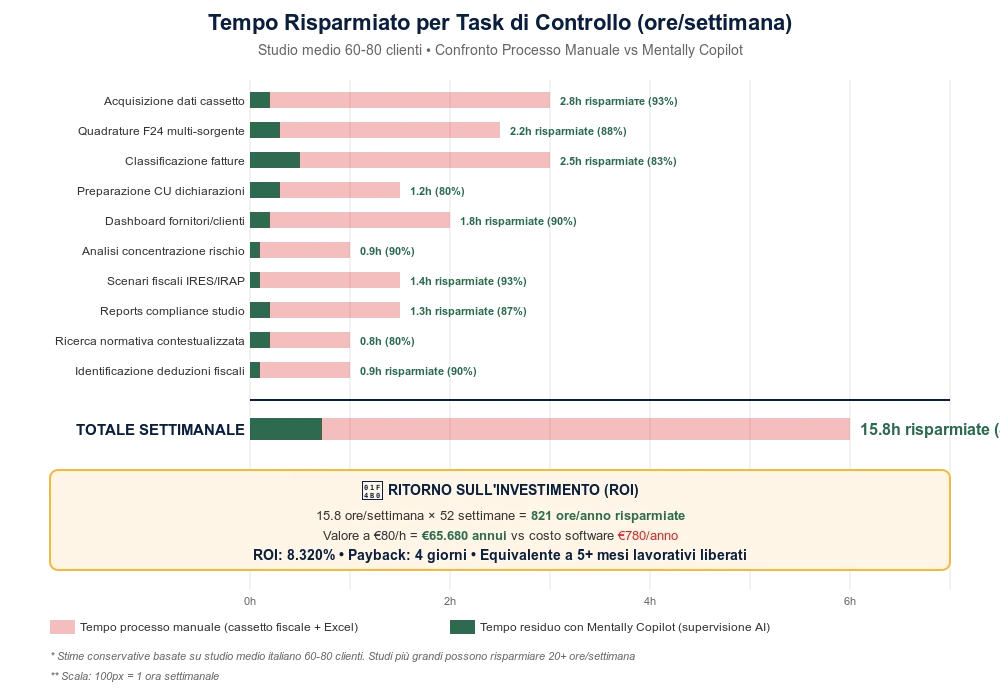
Estimated savings: For an average firm (60-80 clients), operational automation frees approximately 15 hours per week per audit manager. Time that can be reinvested in high-value advisory work or new client acquisition.
The real transformation: From “operational controller” drowning in clicks and manual copies to “strategic supervisor” who analyzes, forecasts, and advises.
Conclusion: The Question That Matters
Sarah currently dedicates 3 hours per week to just one client, “ABC Construction LLC.” Of those 3 hours:
- 2 hours and 15 minutes are IRS portal → Excel → manual controls
- 45 minutes are analysis, interpretation, and real advisory work
Advisory AI would improve those 45 minutes. Operational automation would eliminate those 2 hours and 15 minutes.
The key question for your firm is simple: How much time do you lose each week on manual operations that a machine could do better than you?
If the answer is “too much,” operational automation is the path forward. If the answer is “very little, my problem is interpretive,” an advisory assistant may suffice.
Want to See How Automation Works in Practice?
Evaluate comprehensive automation platforms designed specifically for accounting firms. Look for solutions that integrate:
- Direct portal connections (IRS, state tax authorities, payroll providers)
- Automated reconciliation engines
- Predictive tax scenario modeling
- Integrated regulatory research applied to client-specific data
- Automated compliance reporting
The right platform should eliminate manual data entry, not just make it faster.
For detailed comparison of operational vs. advisory-only features, request a comprehensive feature matrix from solution providers.
Frequently Asked Questions
- What's the difference between advisory AI and operational automation for accounting firms?
- Advisory AI chatbots help answer tax research questions, interpret IRS regulations, and generate client letters. They supplement your thinking but don't touch operational processes. Operational automation platforms actually replace manual work—automatically downloading documents from IRS portals, executing reconciliations, generating tax forecasts, and producing compliance reports. Advisory AI makes you faster at research; operational automation eliminates hours of manual data entry and reconciliation work entirely.
- How much time can accounting firms actually save with operational automation?
- For firms managing 60-80 clients, audit managers typically save 15+ hours per week. This comes from eliminating manual IRS portal downloads, Excel reconciliations, pivot table creation, and report formatting. For example, a task that previously took 3 hours per client (2.25 hours manual operations, 0.75 hours analysis) can be reduced to 0.75 hours of pure strategic analysis, with automation handling the operational work.
- Can AI automation integrate with IRS portals and state tax systems?
- Yes, comprehensive automation platforms can connect to IRS Business Tax Accounts, state tax portals, payroll providers, and accounting software. They automatically acquire W-2s, 1099s, quarterly tax payments, and vendor invoices without manual downloads. The system then reconciles data across sources, flags anomalies, and generates compliance reports—all without human data entry or copy-pasting into Excel.
- Which accounting firms benefit most from operational automation versus advisory-only AI?
- Firms managing 40+ clients with recurring monthly or quarterly compliance work benefit most from operational automation. If your audit managers spend 10-15 hours weekly on IRS portal downloads, Excel reconciliations, and manual data verification, automation delivers immediate ROI. Advisory-only AI works better for boutique firms focused primarily on high-value tax planning where operational processes are already streamlined or handled by dedicated junior staff.
- How does AI automation apply tax regulations to specific client situations?
- Advanced platforms combine regulatory research AI with operational client data. Instead of just answering 'What does Revenue Procedure 2024-15 say?' (generic advisory AI), they answer 'Does Revenue Procedure 2024-15 apply to my LLC with $2M revenue, 15 employees, and government contracts?' by analyzing both the regulation AND your client's actual financial data. This contextualized analysis is impossible with advisory-only chatbots that lack access to client-specific operational information.
- What specific controls does accounting automation improve?
- Automation transforms eight critical controls: (1) invoice and withholding reconciliations with automatic anomaly alerts, (2) multi-source tax payment verification flagging duplicates and missing payments, (3) W-2/1099 pre-population for tax returns, (4) AI-powered expense classification and sales tax verification, (5) automated customer/vendor concentration risk analysis, (6) instant federal and state tax scenario modeling, (7) regulation applicability analysis using actual client data, and (8) auto-generated compliance reports ready for firm documentation.
- Does automation replace the need for experienced audit managers?
- No—it elevates their role. Automation eliminates the 2+ hours per client spent on manual data entry, portal downloads, and Excel reconciliations. This frees experienced managers to focus on strategic analysis, client advisory, complex interpretation, and relationship management. The transformation is from 'operational data processor' to 'strategic supervisor'—doing more high-value work that actually requires professional expertise rather than repetitive clicking and copying.
- Can accounting automation handle tax forecasting and scenario planning?
- Yes, advanced platforms provide instant tax scenario modeling. Instead of manually updating Excel cells and recalculating federal and state taxes for 'what-if' scenarios, you can request multiple forecasts (e.g., 'Show three scenarios: flat revenue, +10%, +25%') and receive complete tax liability projections in seconds. The AI applies current tax rates, deduction limits, and state-specific rules to your client's actual financial data for accurate forecasting.
- What should accounting firms look for when evaluating automation platforms?
- Prioritize platforms offering: (1) direct integration with IRS portals, state tax systems, and payroll providers, (2) automated reconciliation engines that flag anomalies without manual review, (3) AI regulatory research applied to client-specific data (not just generic answers), (4) predictive tax scenario modeling, (5) automated compliance report generation, and (6) structured firm documentation systems. Avoid solutions that simply digitize manual processes without actually eliminating the manual work.
- How quickly can accounting firms implement operational automation?
- Implementation speed varies by platform and firm size, but many modern automation solutions offer rapid deployment. Cloud-based platforms can often connect to IRS portals, accounting software, and payroll systems within days. The key is choosing solutions with pre-built integrations for common accounting software (QuickBooks, Xero, etc.) and tax systems rather than custom-coded integrations. Firms should expect to see measurable time savings within the first month of implementation for routine reconciliation and reporting tasks.